Skip to content
Onitorys
New 6- and 12-month cash flow forecast

Real site figures,
down to the margin.

Timesheets, purchases, receipts, interim valuations: Onitorys tracks every site day by day, right through to gross margin, forecast at completion and cash flow.

  • Mac, iPhone and iPad
  • In sync with the PAPO ecosystem
  • Your data in your iCloud Drive
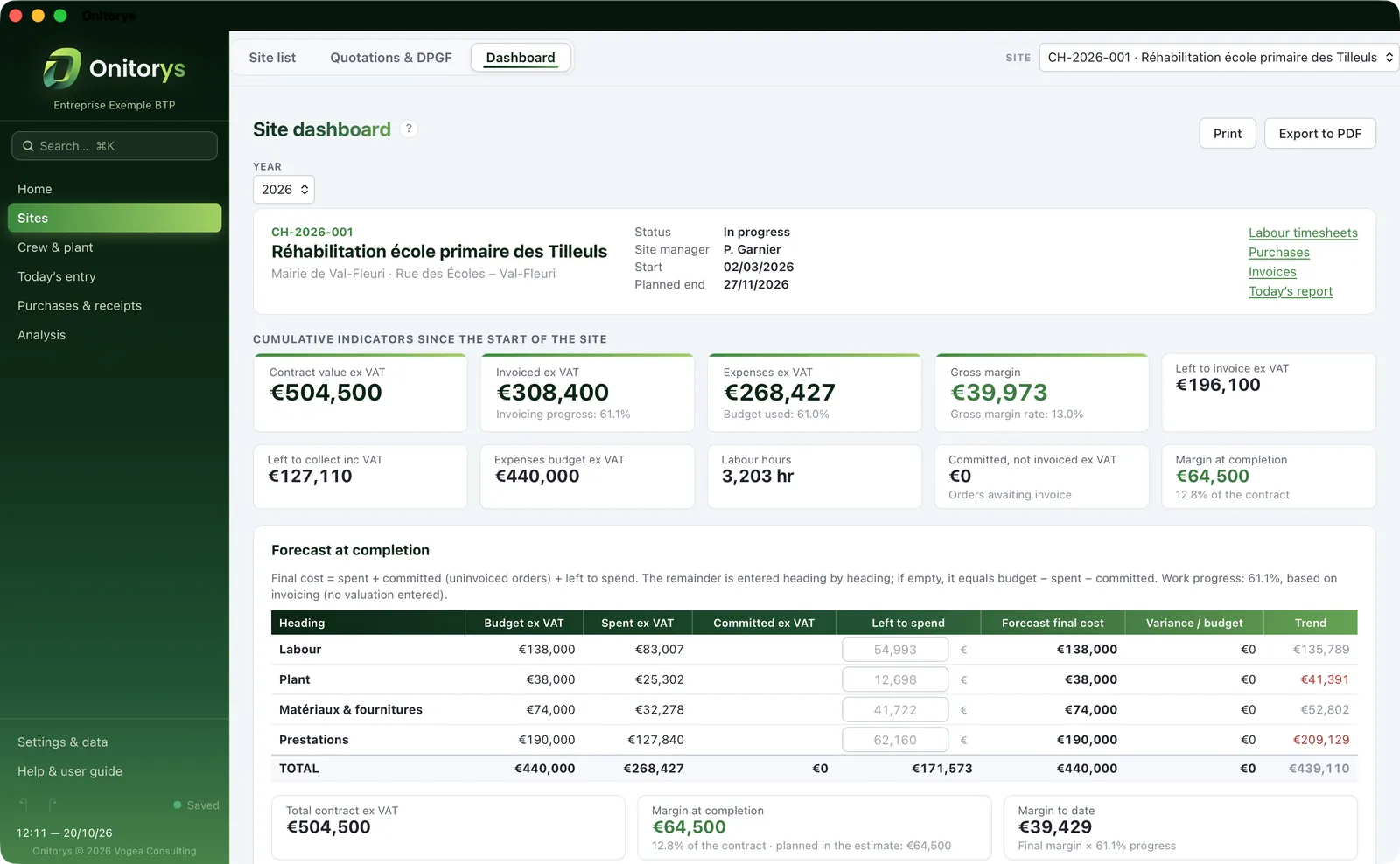
A site dashboard in Onitorys on Mac: contract value, amount invoiced, expenses, gross margin and forecast at completion
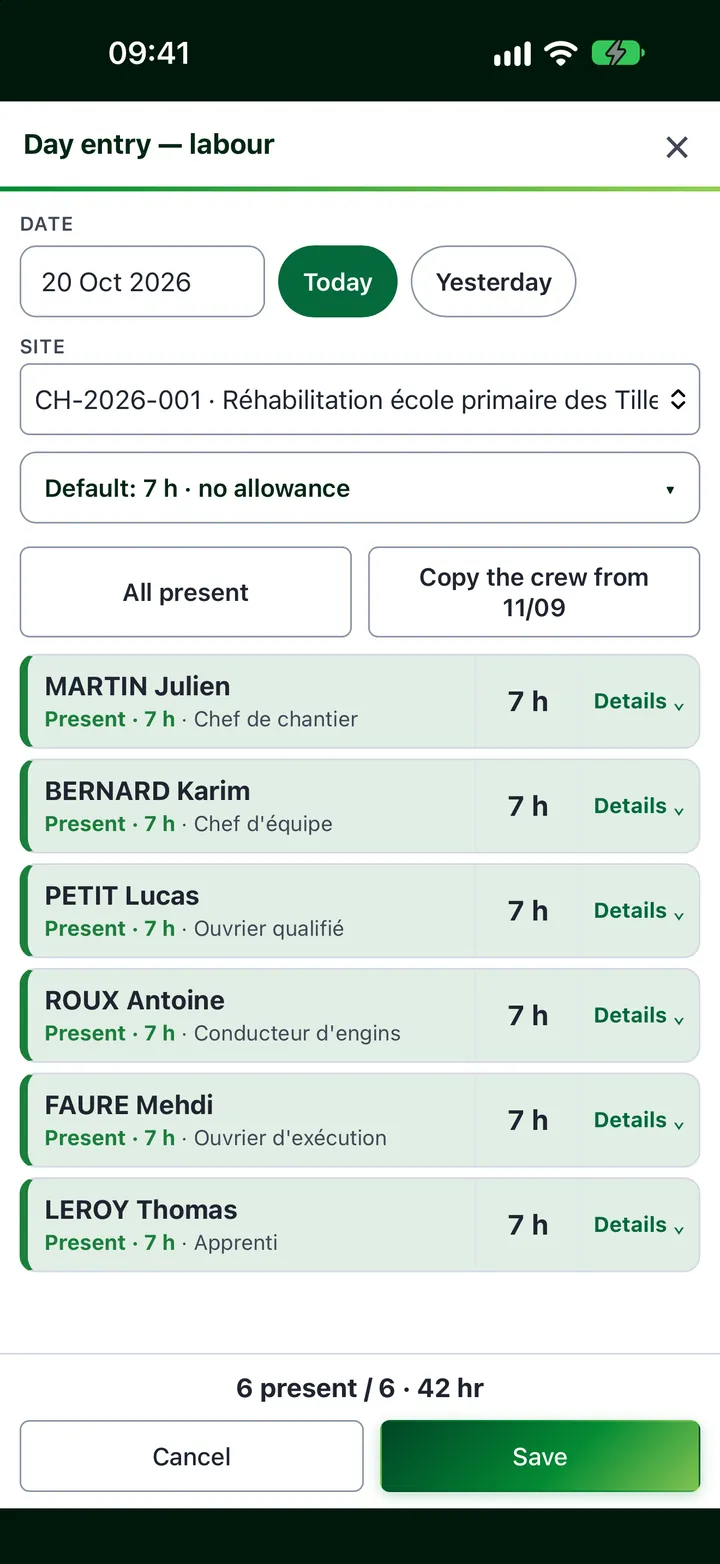
Day entry in Onitorys on iPhone: six employees recorded as present
6
workspaces: home, sites, crew, today’s entry, purchases and receipts, analysis
12
months of cash flow forecasting, low point included
1
single entry to record the whole crew’s time for the day
11
interface languages, from French to Japanese
  • Site managers
  • Site supervisors
  • Directors of construction SMEs
  • Finance and administration managers
  • Accountants
  • Quantity surveyors
Features

Every day on site, every euro tracked.

From the morning timesheet to the margin at completion, Onitorys tracks what really happens – no re-keying, no spreadsheets.

The Onitorys home page on Mac: the year’s figures, management alerts, today’s entry and sites in progress
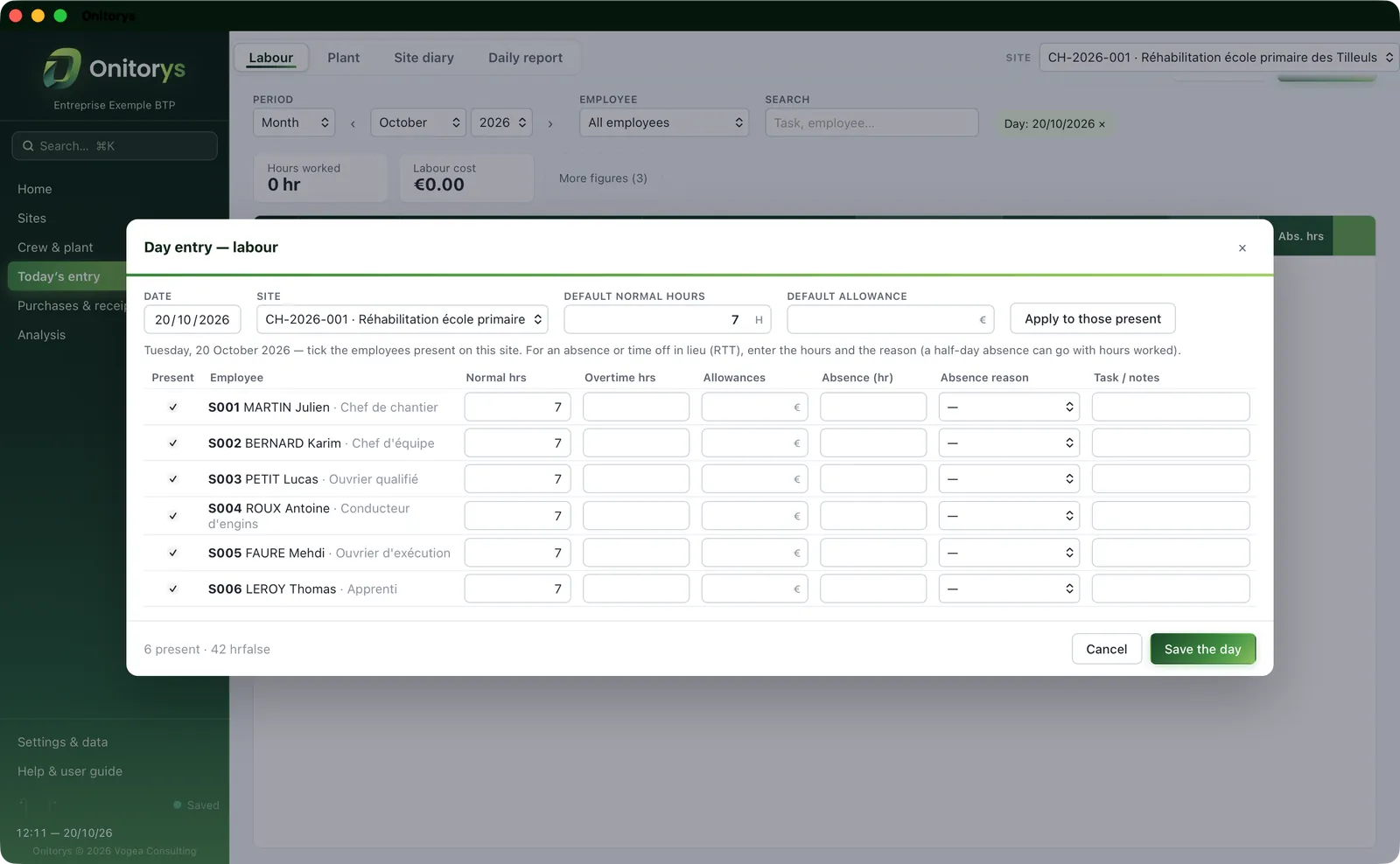
The Onitorys “Day entry” window: employees present, normal hours, overtime hours, allowances and absences
A site dashboard in Onitorys: cumulative indicators and the forecast at completion, heading by heading
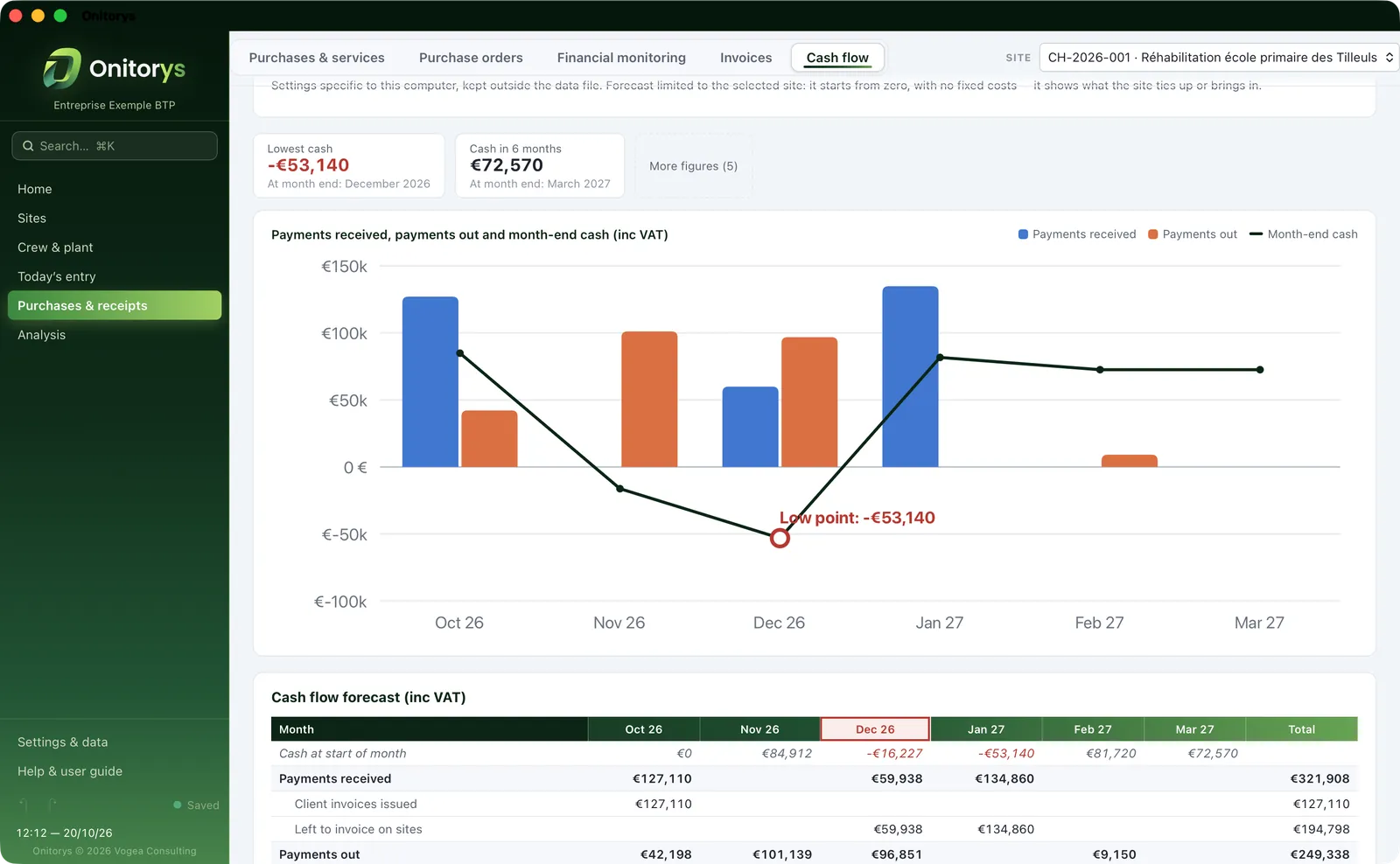
The Onitorys cash flow forecast: payments received, payments out and month-end cash, with the low point
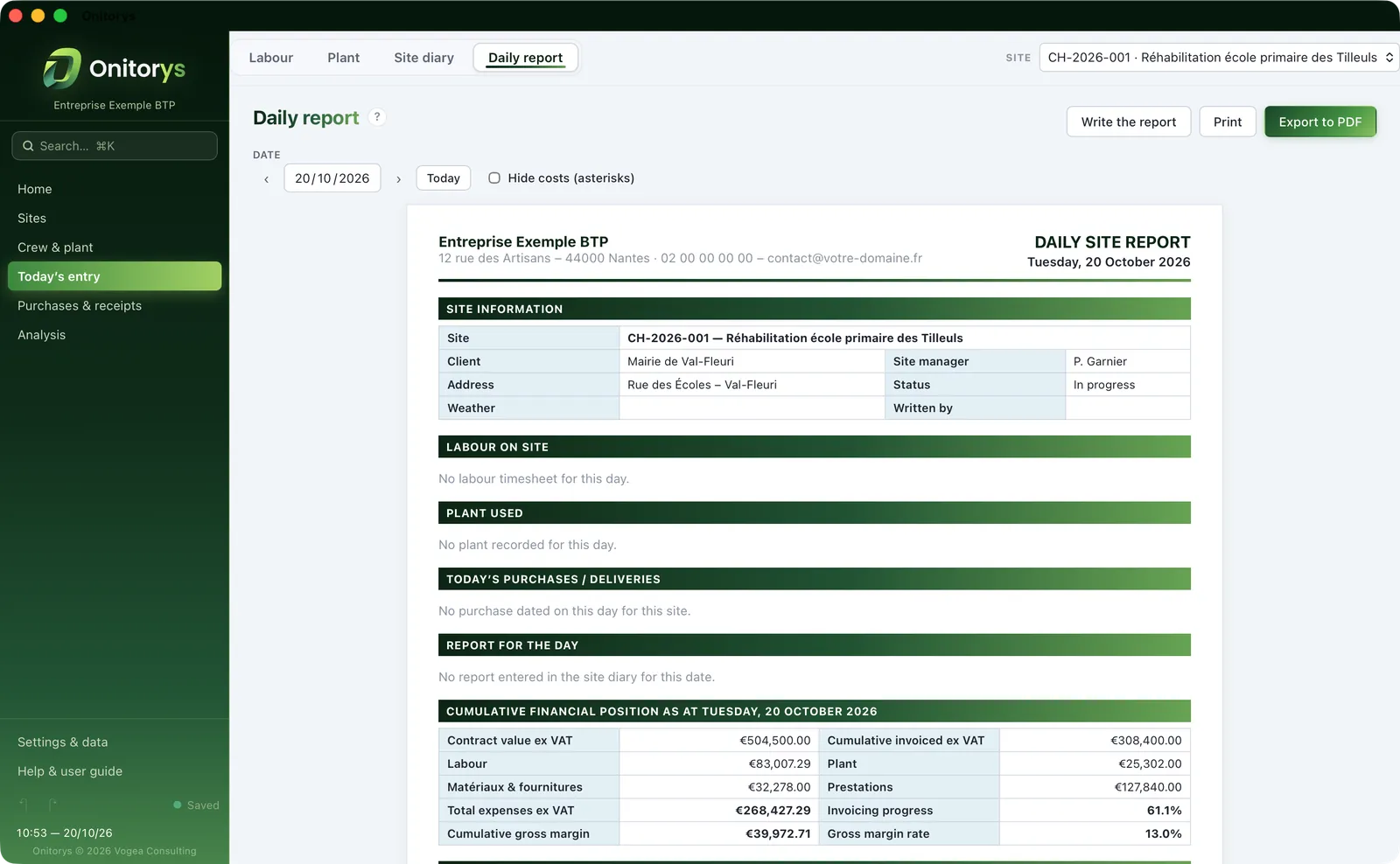
The Onitorys daily site report in A4 format: site information, labour, plant, purchases and financial position
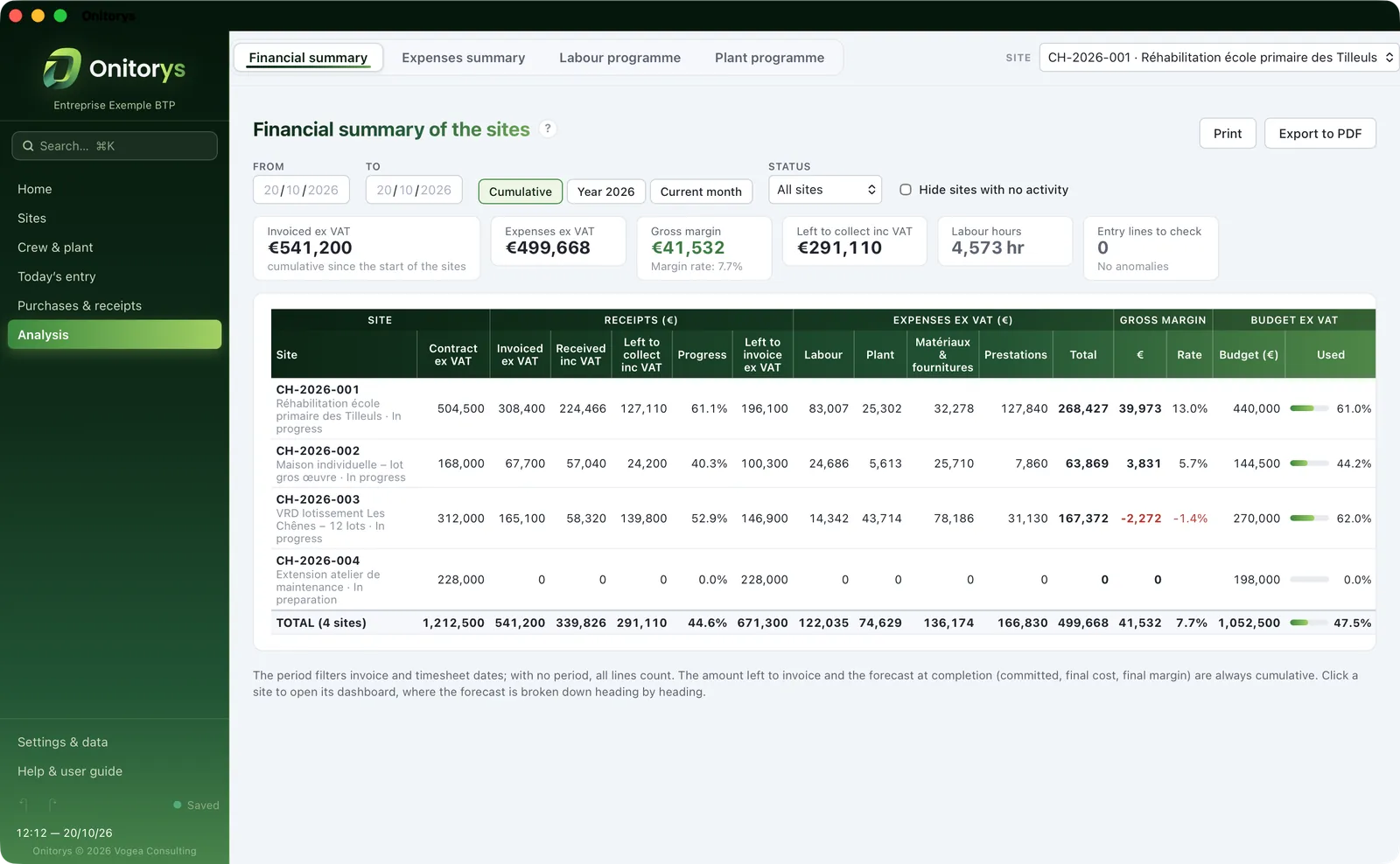
The financial summary of all sites in Onitorys: contract value, amounts invoiced and received, expenses and gross margin by site
01 — Home

Today’s site, all in one place

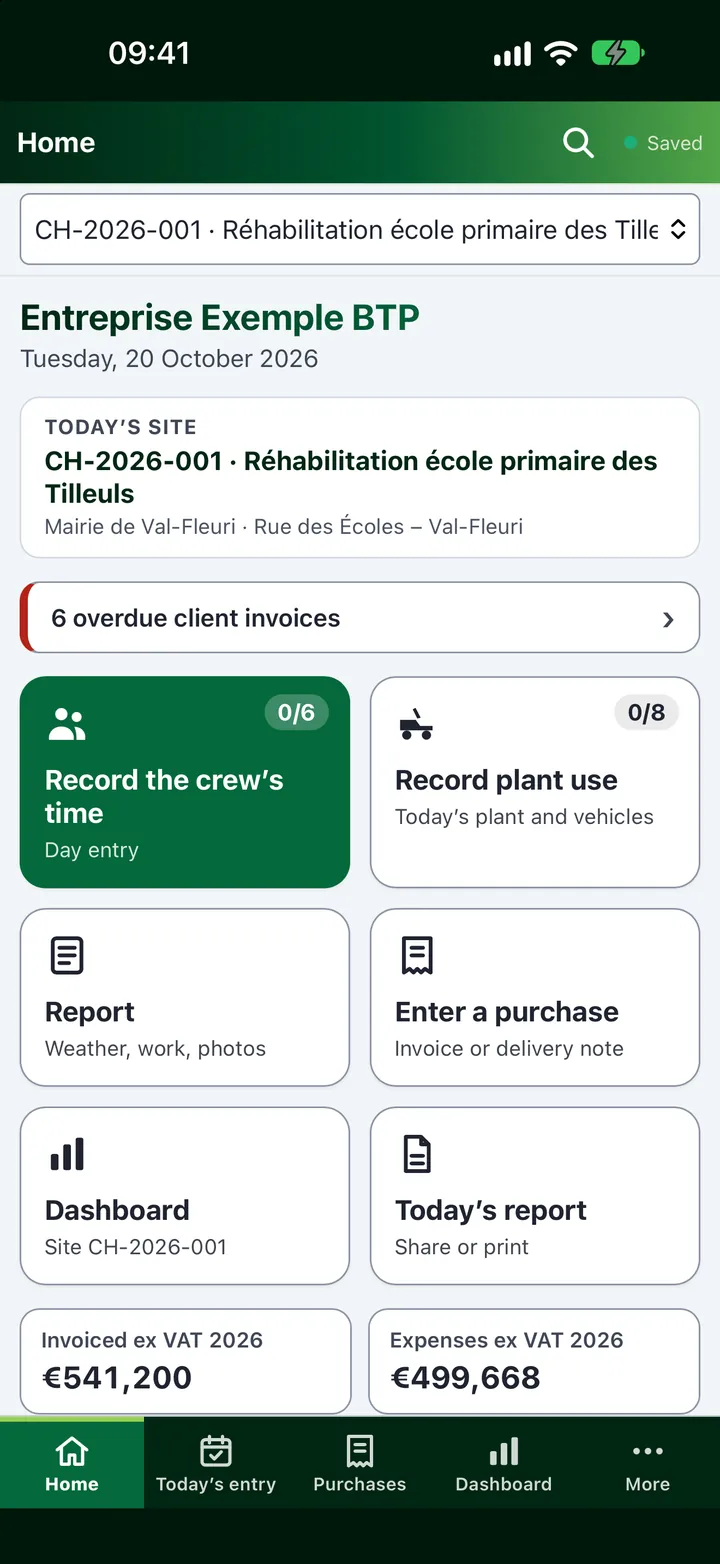
The home page brings together the year’s figures, management alerts and today’s entry: record labour time or plant use, keep the site diary, enter a purchase or an invoice.

  • Management alerts: final cost over budget, cost heading overrun, planned end passed
  • Guided set-up, step by step
  • Sites in progress: contract, invoiced, expenses, margin
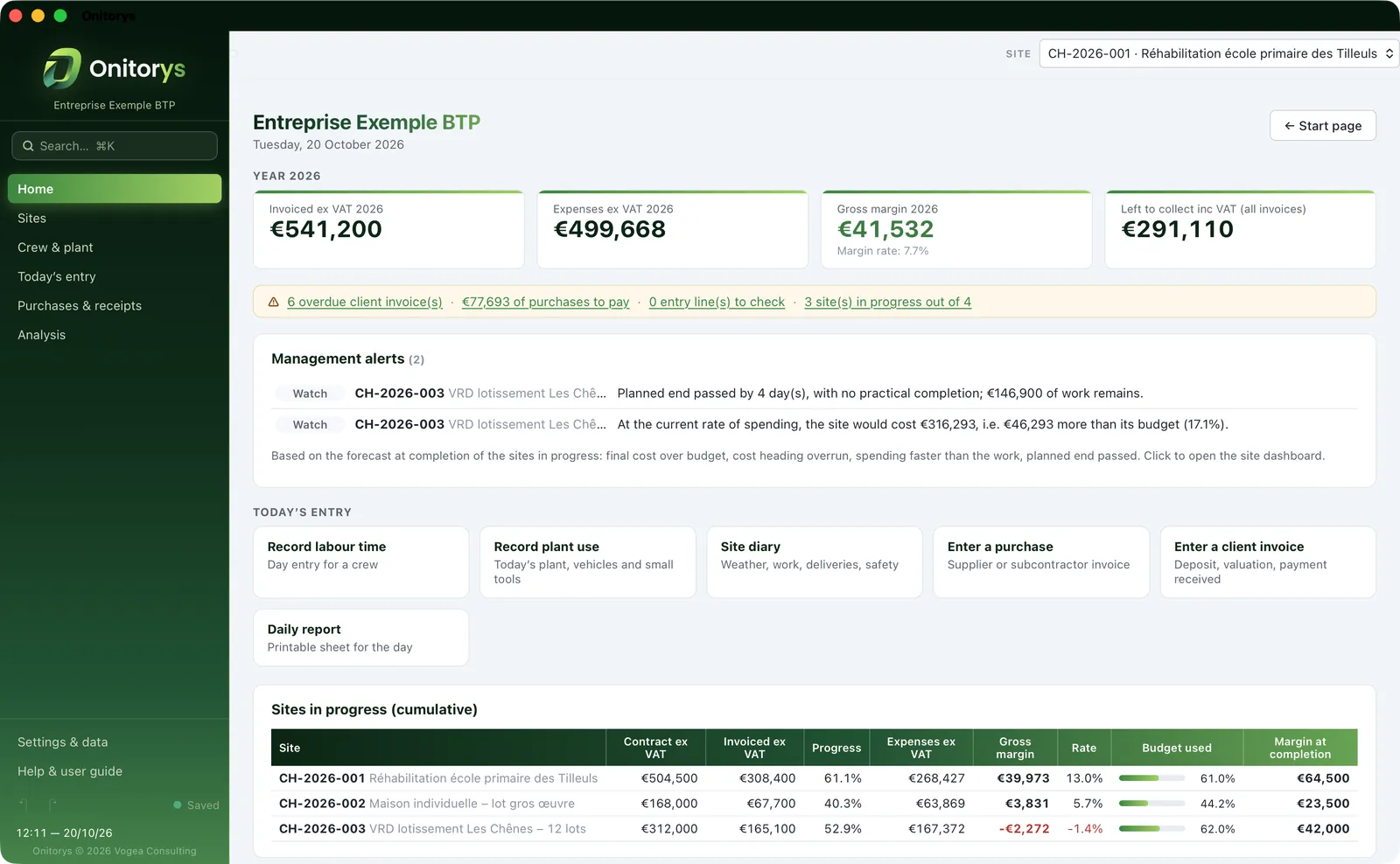
The Onitorys home page on Mac: the year’s figures, management alerts, today’s entry and sites in progress
02 — Day entry

Record the crew’s time in one go

Day entry records a whole crew’s time: who is present, normal hours and overtime, allowances, absences. On iPhone, by touch, right from the site.

  • Labour and plant timesheets, line by line or in a single entry
  • Two-tier overtime
  • Absences and temp workers
The Onitorys “Day entry” window: employees present, normal hours, overtime hours, allowances and absences
03 — Dashboard

Every site’s margin, live

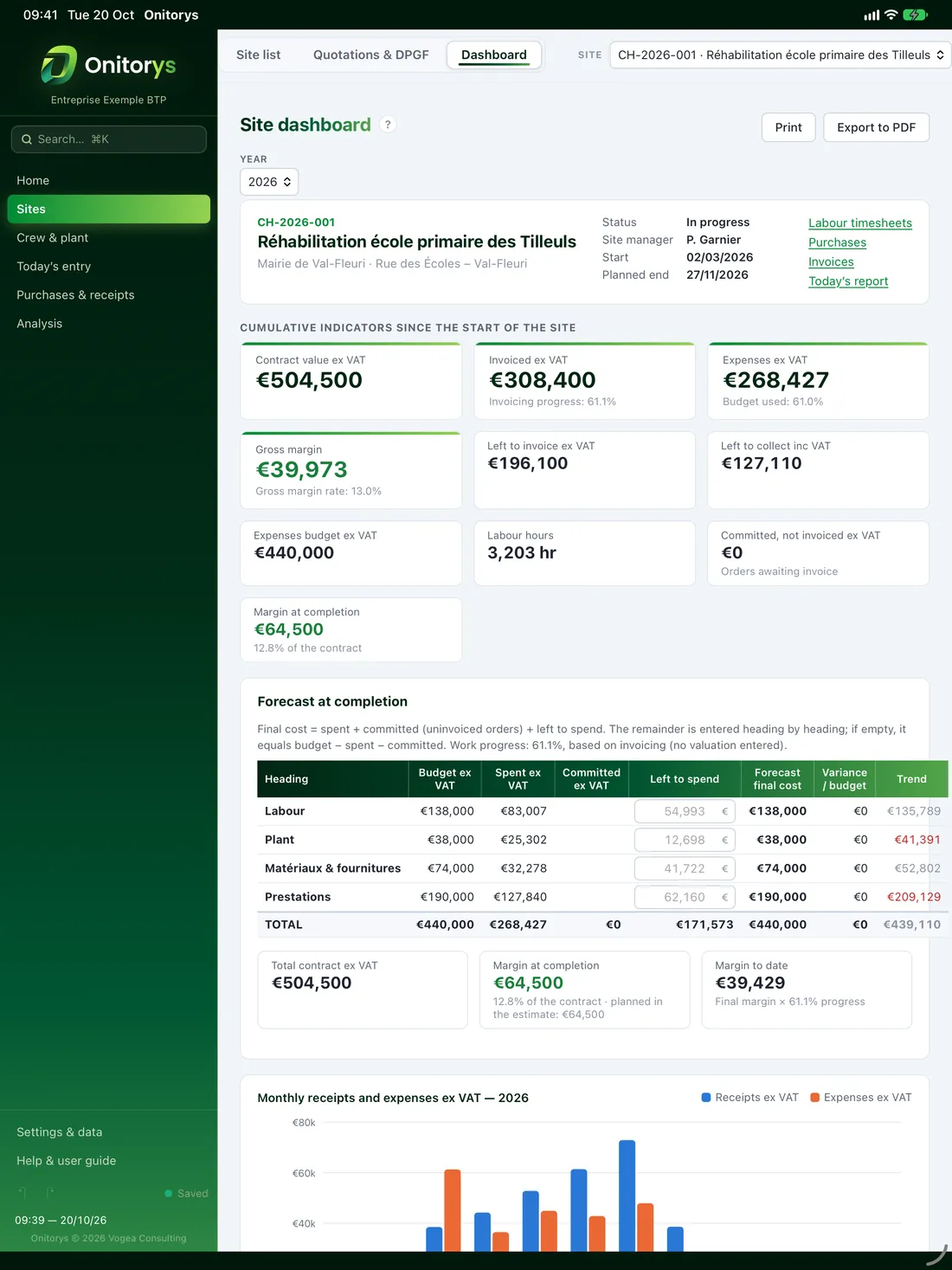
Contract value, amount invoiced, expenses, gross margin: the dashboard updates with every entry and shows the forecast at completion heading by heading.

  • Budget, spent, committed, left to spend, forecast final cost
  • Margin at completion and margin to date
  • PDF export of every page, Excel export of all data
A site dashboard in Onitorys: cumulative indicators and the forecast at completion, heading by heading
04 — Cash flow New

Your cash flow, six months ahead

Payments received, payments out and month-end cash over 6 or 12 months: what your sites have left to invoice and to spend, retentions, fixed costs, net VAT. You can see the low point coming.

  • What is left to collect and to pay, by due date
  • Retention to be claimed one year after practical completion
  • Breakdown by site, with assumptions shown
The Onitorys cash flow forecast: payments received, payments out and month-end cash, with the low point
05 — Daily report

Today’s report, ready to share

Labour on site, plant, purchases and deliveries, report for the day, cumulative financial position: the A4 daily report compiles itself.

  • Site diary with photos
  • Printed or exported to PDF
  • Cumulative financial position as at the report date
The Onitorys daily site report in A4 format: site information, labour, plant, purchases and financial position
06 — Analysis

Your business in clear figures

The financial summary brings all your sites together: invoiced, spent, margin and left to collect. The expenses summary and the monthly labour and plant programmes round off the analysis.

  • Gross margin by site, cumulative or by year
  • Monthly labour and plant programmes
  • The same results as your Excel monitoring workbook
The financial summary of all sites in Onitorys: contract value, amounts invoiced and received, expenses and gross margin by site
Demo

Where will this site’s margin end up?

Final cost = spent + committed + left to spend. Adjust the site manager’s estimate of what is left to spend: the margin at completion follows, and the alert is raised before any overrun.

€504,500
€440,000
€268,427
€18,600
€152,973
Forecast final cost
€440,000
spent + committed + left to spend · 61.0% spent
SpentCommittedLeft to spend
Margin at completion
€64,500
12.8% of contract value
Variance to budget
€0
final cost − budget
Within budgetForecast final cost under budget.

Figures from the fictitious site “Réhabilitation école primaire des Tilleuls” (a primary school refurbishment). In Onitorys, the dashboard runs this calculation heading by heading – labour, plant, materials and supplies, services – from your timesheets, purchases and orders.

And more

From purchases to valuations, full financial monitoring.

Interim valuations

One valuation a month, built from the contract items and variations: an automatic statement with price adjustment or updating, flat-rate advance, retention, VAT and net payable.

New

Cash flow forecast

Six or twelve months of payments received and payments out, with the cash low point and a breakdown by site.

Purchase orders

Numbered, emailed as PDFs, with partial deliveries and invoices: committed costs are always up to date.

Quotations from Prixalys

Won quotations from the estimate come in automatically, and budgets follow its direct cost.

Subcontractor comparison

Item by item, the main contractor’s price against each firm consulted, with the best offer highlighted.

Retentions

One year after practical completion, any unreleased retention is flagged for you to claim.

Diary with photos

The report for the day and its photos, carried straight into the daily report.

True to your workbook

Onitorys follows the logic of the Excel site monitoring workbook, and its own calculations are automatically checked against it.

PAPO ecosystem

Four apps,
one site.

Onitorys is one of Vogea Consulting’s four construction apps – Prixalys, Administratys, Planificatys and Onitorys. They keep each other in sync, with no server, through your iCloud Drive folder: sites, contacts, amounts and actuals move from one to another, so nothing is entered twice.

Onitorys sends

  • The site’s actuals – timesheets, receipts, amounts invoiced – to Planificatys’ S-curve and workload plan
  • The contract value to Planificatys
  • Its sites to Administratys and Planificatys

Onitorys receives

  • Won quotations and budgets from the Prixalys estimate, automatically
  • The site records kept by Administratys
  • The site dates kept by Planificatys
The PAPO ecosystemPrixalys, Administratys, Planificatys and Onitorys exchange their data through your shared folder in iCloud Drive, with no server.Your folderiCloud DrivePrixalysCost estimates and quotationsAdministratysAdministration and documentsPlanificatysSite programmesOnitorysSite monitoring

No server

Each app saves its files in your iCloud Drive folder: all your devices work on the same files, with no online account with us.

Each app reads, none overwrites

An app reads the other apps’ files and never writes to them: there is no shared database and no exchange file.

Nothing gets lost

Synchronisation never deletes anything, and whatever arrives from another app is written to the log of received changes.

Free to switch off

Each app works on its own; synchronisation can be turned off in its settings. An out-of-date version is flagged, without blocking anything.

Devices

Mac, iPhone and iPad.
One app.

Onitorys is a universal app: one app on the App Store for Mac, iPhone and iPad, which adapts to each screen and works on the same files everywhere.

The Onitorys home page on Mac: the year’s figures, management alerts and today’s entry
A site dashboard in Onitorys on iPad
The Onitorys home page on iPhone: today’s site and large entry tiles

On Mac

  • Six workspaces, with the active site chosen just once
  • Global search with ⌘K, user guide with F1
  • Printing the A4 daily report

On iPad

  • The dashboard at site meetings
  • Day entry by touch
  • The same files as on the Mac

On iPhone

  • Bottom bar: home, today’s entry, purchases, dashboard
  • Report photos taken on site
  • “Bright sunlight” theme, for reading in broad daylight
Privacy

Your data stays with you.

Vogea Consulting runs no server for its apps: what you enter stays on your devices and in your folder.

In your folder

Your data is stored in a folder you choose – iCloud Drive, for example, so that your Mac, iPhone and iPad work on the same files – in formats you can read without the app.

Accounts and access

An administrator creates the user accounts, shared by the four apps, and sets access app by app: full, read-only, none, or hidden pages. Passwords are never stored in plain text.

No tracking

No advertising, no analytics, no trackers: the apps collect no data, and Vogea Consulting receives nothing you enter.

Read the apps’ privacy policy.

Pricing

One simple subscription,
all your devices.

Onitorys is a free download on the App Store; you subscribe in the app, in a few seconds, with your Apple Account.

Each app has its own subscription; as soon as you use two of them, they keep each other in sync.

OnitorysMonthly subscription · 2 users
€59.99per month

VAT included, billed by Apple · cancel anytime

  • Two user accounts, with their own access rights
  • Mac, iPhone and iPad: one app, one subscription
  • Every feature and every update
  • Synchronisation with Prixalys, Administratys, Planificatys and Onitorys
  • Your data in your folder, with no server

Price in France, VAT included; elsewhere, the App Store shows the price in your local currency, and the price that applies is the one shown at the time of purchase. The subscription renews automatically every month unless it is cancelled at least 24 hours before the end of the current period, in your Apple Account settings.

FAQ

The answers, before you start.

How is the margin at completion calculated?

Forecast final cost = spent + committed (uninvoiced orders) + left to spend. The site manager enters what is left to spend heading by heading; if nothing is entered, it equals budget − spent − committed. The margin at completion is the contract value minus the forecast final cost.

Can I carry over my Excel monitoring workbook?

Onitorys follows the logic, calculation methods and layout of the “Site monitoring” Excel workbook, and its results are automatically checked against the workbook. Staff and plant lists can be imported from Excel, as can a DPGF (lump-sum price breakdown) or a bill of quantities.

Do interim valuations handle price adjustment?

Yes: fixed, updatable or adjustable prices, with the index (BT01, TP01…) and its adjustment formula. The flat-rate advance, its repayment and the retention are calculated in every valuation, and the client invoice is created from the valuation statement.

How much does Onitorys cost?

Onitorys is a free download on the App Store; using it requires a monthly subscription of €59.99 (price in France, VAT included) for a team of two users, taken out in the app and billed by Apple. The subscription renews every month and can be cancelled at any time in your Apple Account settings. In other countries, the App Store shows the price in your local currency.

Which devices does it run on?

Onitorys is a single app for Mac, iPhone and iPad (universal purchase): the interface adapts to each screen, and one subscription covers all the team’s devices.

Do I need all four apps of the ecosystem?

No. Each app works on its own and has its own subscription. As soon as you use two of them, they synchronise automatically through your data folder; synchronisation can be turned off in the settings if you prefer to work independently.

Where is my data stored?

In a folder you choose, on your devices – in iCloud Drive, for example, to find the same files on your Mac, iPhone and iPad. Vogea Consulting runs no server and receives nothing you enter. See the privacy policy.

Can several people work together?

Yes. The subscription covers two user accounts. An administrator creates the accounts, shared by the four apps, and sets each person’s access, app by app: full, read-only, no access or hidden pages.

Which languages is it available in?

Onitorys is available in English (UK and US), French and nine other languages: Spanish (Spain and Latin America), Portuguese (Portugal and Brazil), German, Italian, Japanese and Korean.

How do I get help?

Onitorys includes its user guide, opened at the right chapter with the F1 key on a Mac, and its release notes. For any question, write to contact@vogea-consulting.fr or use Vogea Consulting’s contact page.

Steer by real figures, not by gut feel.

Download Onitorys from the App Store: your sites’ real figures, every day, down to the margin.